


Introducing Sharding: Running a Playwright Framework on GitHub Actions
- Anuradha Agarwal
- 4 days ago
- 8 min read

Updated: 3 days ago
Joining partway through? This is Post 8 of Phase 3: Enterprise Scalability, part of my Playwright Automation Testing Udemy course.
Post 1, Scale Test Automation lays out what this series is about.
Post 2, Getting Your Playwright Framework Running gets the Playwright framework running on your own machine.
Post 3, Running in Parallel for the First Time is where a single shared login collides with itself the moment you turn workers up from one to four.
Post 4, Designing and Building Concurrency-Safe Authentication built three classes, IdentityProvider, AuthenticationManager, WorkerResolver, each with one job.
Post 5, Worker Scope, the Fixture, and Closing Out Concurrency wired those three classes in, identity isolation closed and proven.
Post 6, Verifying Test Data Isolation checked whether that was enough on its own, a confirmed gap turned up in checkout.
Post 7, Cross-Browser Automation extended the same identity pool and fixture chain to Firefox and WebKit, proven clean, on one machine.
Every one of those posts ran locally. That was never the target, and it's the reason this post exists: taking the same framework to GitHub Actions and introducing sharding, the mechanism for running a suite across more than one machine at once, rather than more workers on the same one.

What sharding actually is, before touching any YAML
Every scaling lever in this series so far has stayed inside the same metaphor from Post 4, Designing and Building Concurrency-Safe Authentication and Post 5, Worker Scope, the Fixture, and Closing Out Concurrency:
One store, staff working shifts, each staff member carrying one badge for the whole shift, picking up one task at a time.
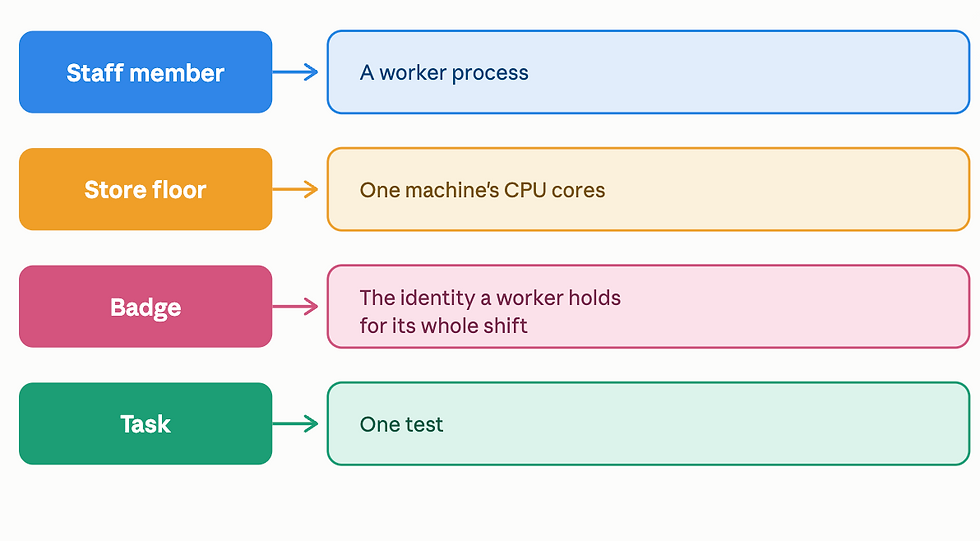
Workers added more staff to that one store's floor at once: more worker processes, same machine, same fixed core count underneath them.
Cross-browser gave each staff member a wider range of task types to handle; the same workers, now picking up Chromium, Firefox, or WebKit tasks depending on what's next in the queue, still on that one floor.
Sharding is a different move entirely: instead of adding more staff to one store, open a second store, a second machine, its own CPU cores, its own workers, its own shift, working through half the day's orders while the first store handles the other half, at the same time. --shard=1/2 is one store's half of the order list, --shard=2/2 is the other store's half, disjoint, no overlap. Run both, and together they cover the full day's orders once, in roughly half the time either store alone would need.
This is a genuinely different move than adding staff. One store's floor space is fixed; that's one machine's CPU core count. No matter how many worker processes get scheduled onto it, that ceiling doesn't move.
A second store doesn't raise the first store's ceiling; it's a second machine, an entirely separate ceiling, its own cores, its own workers, working in parallel with the first.
At day's end, both stores' sales get combined into one company-wide report, which is exactly what merge-reports does later in this post:
One shared report, from two machines that never shared a core while the work was happening. That's the concept.

Everything from here proves it on genuine infrastructure, not just describes it: the same secrets, the same workflow file, the same shard matrix built step by step in the Playwright Automation Testing Udemy course, if you'd rather build this alongside the videos than read it after the fact.
Setting up the workflow
Add these as repository secrets:
GitHub → Settings → Secrets and variables → Actions,
matching the same four qa-cart.com accounts and WooCommerce API key already sitting in .env locally: BASE_URL, API_BASE_URL, WC_BASE_URL, WC_CONSUMER_KEY, WC_CONSUMER_SECRET, and TEST_USER_1_EMAIL through TEST_USER_4_PASSWORD, twelve values in total.
Modify this file: .github/workflows/playwright.yml, so every secret actually reaches the job:
env:
  BASE_URL: ${{ secrets.BASE_URL }}
  API_BASE_URL: ${{ secrets.API_BASE_URL }}
  WC_BASE_URL: ${{ secrets.WC_BASE_URL }}
  WC_CONSUMER_KEY: ${{ secrets.WC_CONSUMER_KEY }}
  WC_CONSUMER_SECRET: ${{ secrets.WC_CONSUMER_SECRET }}
  TEST_USER_1_EMAIL: ${{ secrets.TEST_USER_1_EMAIL }}
  TEST_USER_1_PASSWORD: ${{ secrets.TEST_USER_1_PASSWORD }}
  TEST_USER_2_EMAIL: ${{ secrets.TEST_USER_2_EMAIL }}
  TEST_USER_2_PASSWORD: ${{ secrets.TEST_USER_2_PASSWORD }}
  TEST_USER_3_EMAIL: ${{ secrets.TEST_USER_3_EMAIL }}
  TEST_USER_3_PASSWORD: ${{ secrets.TEST_USER_3_PASSWORD }}
  TEST_USER_4_EMAIL: ${{ secrets.TEST_USER_4_EMAIL }}
  TEST_USER_4_PASSWORD: ${{ secrets.TEST_USER_4_PASSWORD }}
A secret existing on GitHub and a secret actually reaching a running job are two different things; this env: block is what connects them, every value the framework needs, explicitly listed, nothing left implicit.
Verifying a single run, before sharding enters the picture
CI hadn't gotten past a TypeError and a config-validation exit code before this point in the series. Before sharding, the baseline is a full, unsharded run that completes.
bash
npx playwright test --workers=4No --shard, one job, everything at once, all three browser projects, no tag filter. This is the full suite, exactly as it exists today.
Running 85 tests using 4 workers
Parallel 2 -> user3
Parallel 3 -> user4
Parallel 0 -> user1
Parallel 1 -> user2
Four identities, four slots, correct, holding across the whole run despite Worker climbing well past 4 as retries and recycled processes accumulated, exactly the workerIndex versus parallelIndex distinction from Post 5. parallelIndex stayed bounded 0 through 3 the entire time, no wraparound, no identity collision, on GitHub Actions this time, not a local machine.
Two tests went flaky, both in checkout.journey.spec.ts, both on the same step, both on Firefox and WebKit specifically, not Chromium:
Error: page.waitForURL: Target page, context or browser has been closedBoth passed on retry. Not diagnosed further here, since this post's job is sharding, not this specific flake; a browser-engine-specific timing issue is a separate thread worth pulling later.
45 skipped
38 passed (3.4m)
Why this matters past a demo suite
3.4 minutes for 14 active tests across three browsers. Enterprise regression suites commonly run into the hundreds or low thousands of tests once a product has been shipping for a year or two. The ratio that matters is tests to fixed hardware: one job, one runner, one core count, working through however many tests exist, serially within that job no matter how many workers are configured, since workers only add concurrency inside a single runner's ceiling. Multiply this suite by ten, and the same 3.4 minutes doesn't stay 3.4 minutes, it becomes a CI pipeline a team is waiting on inside a PR-merge workflow, where wait time directly slows down how fast that team ships.
Sharding is the standard answer to that shape of problem, not a Playwright-specific trick: splitting one long serial job into several shorter parallel ones, each on its own runner, so total suite size and total wait time stop being the same number.

Splitting the suite
Sharding is Playwright's own answer to "run on more than one machine," no custom logic needed. --shard=1/2 runs the first half of the discovered test files, --shard=2/2 runs the second half- disjoint slices of the same suite.
That file-level split only stays safe because of work this series already did, not because of anything sharding itself guarantees.
Splitting files across machines means giving up any assumption about execution order between them entirely; checkout.journey.spec.ts might run on shard 1 while cart.validation.spec.ts runs on shard 2, at the same time, on two machines that share nothing.
If a test file depended on another file having run first, or on shared state neither file owned outright, sharding would expose that instantly; two machines can't coordinate an ordering neither one knows about.
The reason --shard is safe to reach for here without writing anything custom is that Posts 4 through 6 are already independent: each test file has its own identity for the whole run and its own verified isolation from whatever ran before it.
Sharding isn't creating that independence; it's relying on it.
Modify this file: .github/workflows/playwright.yml. The single test job becomes a matrix with two shards, each its own runner:
jobs:
  test:
    timeout-minutes: 60
    runs-on: ubuntu-latest
    strategy:
      matrix:
        shardIndex: [1, 2]
        shardTotal: [2]
      max-parallel: 1
    env:
      # same twelve secrets as before, unchanged
    steps:
    - uses: actions/checkout@v4
    - uses: actions/setup-node@v4
      with:
        node-version: lts/*
    - name: Install dependencies
      run: npm ci
    - name: Install Playwright Browsers
      run: npx playwright install --with-deps
    - name: Setup Java
      uses: actions/setup-java@v4
      with:
        distribution: temurin
        java-version: '17'
    - name: Run Playwright tests
      run: npx playwright test --shard=${{ matrix.shardIndex }}/${{ matrix.shardTotal }} --workers=4

    - name: Upload blob report
      uses: actions/upload-artifact@v4
      if: ${{ !cancelled() }}
      with:
        name: blob-report-${{ matrix.shardIndex }}
        path: blob-report/
        retention-days: 7
    - name: Upload allure-results
      uses: actions/upload-artifact@v4
      if: ${{ !cancelled() }}
      with:
        name: allure-results-${{ matrix.shardIndex }}
        path: allure-results/
        retention-days: 7

  merge-reports:
    needs: test
    runs-on: ubuntu-latest
    if: ${{ !cancelled() }}
    steps:
      - uses: actions/checkout@v4
      - name: Merge blob reports
        uses: actions/download-artifact@v4
        with:
          pattern: blob-report-*
          merge-multiple: true
          path: all-blob-reports
      - run: npx playwright merge-reports --reporter=html ./all-blob-reports

      - name: Combine allure-results
        uses: actions/download-artifact@v4
        with:
          pattern: allure-results-*
          merge-multiple: true
          path: allure-results
      - uses: actions/setup-java@v4
        with:
          java-version: '17'
          distribution: 'temurin'
      - run: npm install -g allure-commandline
      - run: allure generate allure-results --clean -o allure-report
Two jobs, not one. test becomes two parallel runners, each running half the suite, each authenticating its own identities through auth.setup.ts independently, the same "no shared memory" reasoning from Post 4, now proven across separate GitHub-hosted runners instead of separate local worker processes.
merge-reports only starts once both shards finish, and does two genuinely different jobs, since the config runs two separate reporters, [['blob'], ['allure-playwright']]. merge-reports (Playwright's own CLI) folds the blob artefacts into one HTML report, traces included.
Allure has no equivalent merge command of its own, so its step is really just combining every shard's allure-results folder into one directory, then generating once from the combined set.
max-parallel: 1 on the matrix looks like it's working against the whole point of sharding, so it's worth being precise about why it's set that way. Earlier in this build, an I/O ceiling on qa-cart.com's own hosting backend was confirmed, with throughput hitting a hard limit under concurrent load, well before CPU or memory became the bottleneck. That finding was from a single machine running four workers, not from two separate GitHub Actions runners hitting the backend at the same time, which is a different scenario, never actually tested. max-parallel: 1 here is a cautious default carried over from a related but not identical finding, not a proven necessity for this specific setup. The honest way to settle it is to actually test max-parallel: 2 and watch whether either shard slows down or starts timing out compared to running alone, that's the evidence this claim is currently missing.
What actually happened when running it

Both shards passed, merge-reports completed in 37 seconds; blob merge, Allure combine, Allure generate, all green.
The merged Allure report is what actually proves the merge worked, not just the green checkmark. It's not served the way npx playwright show-report automatically does locally, since the runner that produced it is already gone by the time the job finishes.
The workflow run's summary page has an Artefacts section below the job graph, allure-report listed as a downloadable .zip.

Download it, unzip it, then serve it properly. Allure needs a local server, opening index.html directly won't render correctly:

npx allure open allure-reportT
That's what one merged view of both shards actually looks like:

What's next
Sharding solved a speed problem: more machines working through the suite at once. It didn't solve a different problem that shows up the moment a framework leaves one team's hands:
Every machine that runs this suite- your laptop, a teammate's laptop, a GitHub-hosted runner, an on-prem Jenkins box a larger org might already be running- can end up with a slightly different Node version, a different OS, or browser binaries installed at a different point in time. None of that shows up as an error most days. It shows up as "it fails on my machine but not in CI," or the reverse, the exact kind of bug that eats an afternoon and turns out to have nothing to do with the test itself.
That's the enterprise-relevant reason Docker earns its place in this series, not speed, but portability. A container fixes the entire environment- Node version, OS, browser binaries- once, and every machine that runs it gets the identical thing, whether that's a new hire's first day, a CI platform the company migrates to next year, or a teammate reproducing a CI failure locally to debug it properly instead of guessing.
The next post starts from the beginning for anyone who hasn't containerized a Playwright project before, what a Dockerfile actually is, why Playwright ships its own base images instead of expecting you to install browser dependencies by hand, and why the image gets built once instead of installing anything fresh on every run, before this exact framework gets containerized and run, first locally, then wired into the GitHub Actions workflow already built across this post and the one before it.
This is Post 8 of the Phase 3: Enterprise Scalability series. Post 1 · Post 2 · Post 3 · Post 4 · Post 5 · Post 6 · Post 7 · Repo link · Course link


