


Before You Start Playwright: Comparison with Other Automation Tools

What is automation testing and why does it matter
Before we jump into action with Playwright, let’s take a step back. If you’re new to automation, I want us to start from the same foundation.
So, what is automation testing, and why does it even matter?
Testing has always been at the heart of building quality software. And manual testing still plays a critical role. It brings something automation never can—human judgment, curiosity, the ability to explore and catch what no script was designed to find.
But here’s where things change.
As applications grow and teams start releasing multiple times a day, a different kind of work starts to pile up. The repetitive kind. Regression tests across browsers. Login flows. Checkout validations—again and again, after every single change.
At that point, it’s no longer just about testing.
It becomes a capacity problem. There simply aren’t enough hours to keep doing all of this manually.
And that’s exactly where automation fits in—not to replace testers, but to take this repetitive load off their plate, so they can focus on the kind of testing that actually needs a human mind.
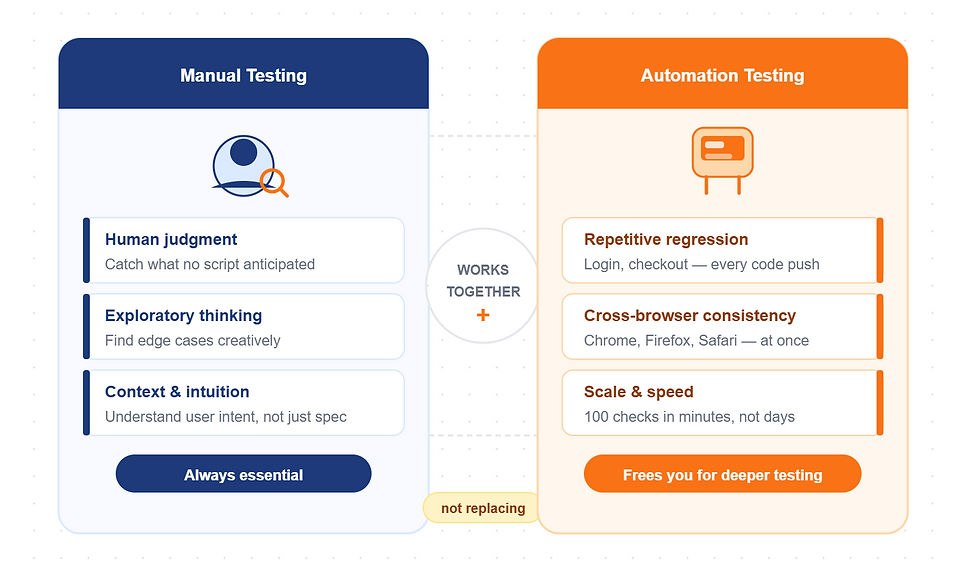
So what is automation testing? Instead of a human clicking through the application, we write a program that does it for us. Opens the browser, fills forms, clicks buttons, reads results, tells us if something broke. We call these programs test scripts. And we run them every time code changes — automatically.

What is a test automation framework?
In the last lecture we talked about test scripts — programs that open a browser, fill forms, click buttons and tell us if something broke.
But here is the reality. Scripts alone are not enough.
Imagine you have written fifty test scripts. Where do they live? How does the team find them? How do you run them all together? What happens when one fails — do you get a screenshot? A report? Can you replay exactly what went wrong? And when your application changes, how do you update tests without rewriting everything from scratch?

These are not testing questions. They are engineering questions. And the answer to all of them is a framework.

A test automation framework is more than the tool itself. It is the complete structure that helps you write, run, maintain, debug and report automated tests.
Think of it this way. Playwright is the engine. The framework is the car built around it — the structure, the controls, the dashboard, everything that makes the engine actually useful in the real world.
So what does a framework include? Let me walk you through it.
The automation tool — Playwright in our case — is what talks to the browser. But around it you build a project structure — organised folders for tests, pages, utilities, configuration. So anyone on the team can open the project and immediately understand where everything lives.
You build reusable utilities — common actions like login, search, add to cart — written once, used everywhere. When the login flow changes, you update one file, not fifty tests.
You define a locator strategy — a consistent way to identify elements on the page. No guessing, no random selectors scattered across files.
You implement a Page Object Model — classes that represent each page of your application. A LoginPage. A CartPage. A CheckoutPage. Your tests talk to these classes, not directly to the browser. This is what makes tests readable and maintainable at scale.
You manage test data externally — from JSON files, CSV, environment variables, APIs or databases. Your test logic stays clean. The same test can run with ten different datasets without changing a single line of code.
You set up configuration — which browser, which base URL, what timeouts, how many retries, whether to record screenshots or video. One file controls all of it.
You write assertions — the checks that validate whether what happened is what you expected. Did the cart update? Did the order confirm? Did the error message appear?
You set up reporting — so after every run you get a clear picture of what passed, what failed, and why. HTML reports, Allure reports, screenshots, videos, traces.
You build in logging and debugging — console logs, Playwright's trace viewer, structured error handling. So when something goes wrong in CI you can replay it step by step without running it again.
You integrate with CI/CD — GitHub Actions, Jenkins, GitLab CI. This is what makes the reporting meaningful. Tests do not just run on your laptop. They run automatically on every single code push. The team gets instant feedback.
You manage environments — dev, QA, staging, production. Same tests, different URLs and credentials, switching with one config change.
And you maintain a maintenance strategy — clean code, consistent naming, no duplication. Because a framework that nobody can read or update is not a framework. It is technical debt.
That is fourteen elements. And we are going to build every single one of them together in this course.
A tool helps us automate browser actions. A framework is the complete structure around that tool — how we organise tests, reuse code, manage data, run execution, handle reports, debug failures, and integrate everything into CI.
By the time you finish this course, you will not just know Playwright. You will have a production-ready framework. That is what we are building.
Selenium, Cypress and Playwright — the evolution
Today, we look at three of the most important tools in this space. Selenium, Cypress, and Playwright. Each was built in a different era. Each one solves the problems of the previous generation.
Understanding that journey will tell you exactly why Playwright is the tool we are learning in this course.

To understand why Playwright exists, you need to understand what came before it. Because each of these tools was built in response to real pain.
Selenium came first in 2004. At a time when automating a browser was considered nearly impossible, Selenium figured it out. It became the industry standard. Entire careers were built on it. But Selenium was designed before modern JavaScript-heavy applications existed, before CI pipelines were standard, before anyone expected a framework to handle timing automatically. Those limitations became the daily frustration of every automation engineer using it in a real project.

Cypress arrived in 2014 and genuinely changed the conversation. It ran inside the browser itself, handled a lot of waiting automatically, and gave developers an experience that actually felt modern. For many teams, it was a revelation. But Cypress made architectural choices that created hard walls — JavaScript only, no Safari support, no multiple tabs, no cross-origin flows. Walls you hit quickly in any serious application.

Playwright arrived in 2020. Built by engineers who had already built Puppeteer at Google. They knew exactly what both tools got wrong. And they built Playwright specifically to address all of it.
Three tools. Three eras. Each one is a response to the previous generation's limitations. That is the journey. Next, we look at exactly what Playwright does differently.

Why Playwright wins — capability deep dive

Let me walk through the specific capabilities — because for a complete beginner, these words need context, not just a table.
Browser support. Selenium supports Chrome, Firefox, Edge and Safari — but each needs its own driver that you download, version-match and maintain yourself. Cypress drops Safari entirely — no WebKit support at all. Playwright supports Chromium, Firefox and WebKit, all three bundled. You run one command, and Playwright downloads exactly the right versions itself. You never touch a driver again.

Auto-wait. In Selenium you write WebDriverWait and expected_conditions manually — every single element, every single action. Miss one and your test fails randomly. Cypress improved this but only partially — its command queue handles some timing, not all. Playwright builds waiting into every action automatically. Every click, every fill, every assertion waits for the element to be visible, stable, enabled and ready. You write nothing extra. Tests that are reliable by default.

Language support. Selenium supports multiple languages — that is one thing it genuinely got right. Cypress is JavaScript and TypeScript only — hard architectural limit, not a configuration choice. Playwright matches Selenium's breadth — JavaScript, TypeScript, Python, Java, C#. In this course we use TypeScript.

Parallel execution means running multiple tests at the same time instead of one after another.
If you run tests one by one (sequentially), a suite might take 10 minutes.If you run them in parallel, the same tests can finish in 2 minutes—because they are running together.
Now, how different tools handle this:
With Selenium, you need something called Grid—a separate setup where you manage multiple machines or browsers.
With Cypress, parallel execution is tied to their Cloud service, which is paid.
With Playwright, it’s built in. No setup, no extra cost. Tests run in parallel by default.

Trace viewer and debugging. Selenium has no built-in trace. When a test fails in CI you get an error message and you guess. Cypress offers video recording — on the paid plan. Playwright gives you a complete trace file for free. Every action, every DOM snapshot, every network call. Download it, open it, replay it step by step. This is the debugging tool automation engineers have wanted for twenty years.

This is what the comparison looks like when you go beyond the table. Every capability has a story — and in every story, Playwright is the answer to a real limitation the previous tools left unsolved.

The Playwright promise. One API. Three real browser engines. Intelligent waiting is built into every action. A free trace viewer that shows you exactly what happened. Multi-language support. Parallel execution out of the box. This is what we are building in this course. And I can tell you from experience — once you feel the difference, once you write a test that just works, without a single manual wait condition, without a browser driver setup, without guessing what happened in CI — there is no going back.
Playwright in the AI era — MCP and beyond

Playwright is no longer just a testing tool. It is becoming the execution layer for AI-driven automation.
Here's what that actually means in practice — three shifts happening right now.
AI-driven test generation. With tools like GitHub Copilot and Cursor, you describe a user flow — login, search a product, add to cart — and AI generates a Playwright test for you. It's not perfect, but it's a strong starting point. You move faster and focus on refining, not writing from scratch.
AI-assisted debugging. When a test fails, you're no longer alone with a log file. Playwright produces a trace file — a complete recording of every action, network call, and DOM state. Feed that trace, the error, and the failing step to an AI model. It explains what broke, suggests a fix, and can even refactor the test. Debugging becomes faster and far more precise.
AI agents + Playwright via MCP. This is the deeper shift. With the Model Context Protocol, AI systems can use tools, including browsers. When an agent needs to open a website, click a button, fill a form, or read a result, it needs something to execute those actions in the real world. That execution layer is Playwright. This is what makes AI agents useful in real applications.
What this means for you. Combine AI for generation, AI for debugging, and Playwright for execution — and you get a completely new model of test automation. Faster to build. Easier to maintain. Aligned with where software development is heading.


